Working form
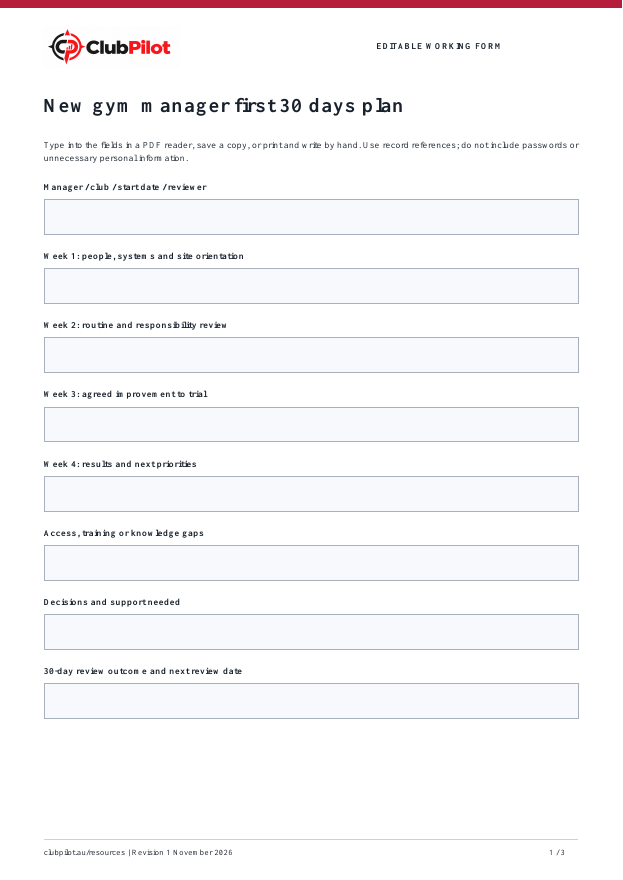
Record manager / club / start date / reviewer, week 1: people, systems and site orientation, week 2: routine and responsibility review and the next action.

FREE FILLABLE GYM TEMPLATE
Help a new manager learn the club, establish responsibilities and agree priorities before changing routines. Use weekly checkpoints with the area manager to turn observations into practical actions.
By Callan, ClubPilot · Updated
Free PDF · Print and adapt · No sign-up required
AT A GLANCE
Record manager / club / start date / reviewer, week 1: people, systems and site orientation, week 2: routine and responsibility review and the next action.
Eight checks, plus space for the action owner, due date, evidence and review.
A fictional completed example explains the detail to capture without using customer records.
WORKED EXAMPLE
Example Fitness and all people, dates, amounts and outcomes below are fictional. They are not benchmarks or promised results.
Alex / Example Fitness North / 2 November / area manager
Meet team; review approved procedures and outstanding faults
Map daily, weekly and monthly ownership with the team
Trial a consistent handover record after approval
Review missed actions and team feedback; keep or adjust trial
Finance report access pending; request approved role access
Confirm supplier approval limits and escalation contacts
Review due 1 December; no performance result claimed yet
FROM TEMPLATE TO WORKFLOW
The free form helps define the process. Explore the relevant ClubPilot workflow and confirm the setup your group needs.
See the product area connected to this template.
Explore ClubPilotSee available walkthroughs before trying the workspace.
Watch walkthroughsHOW IT WORKS
Agree expectations and access with the reviewer before starting.
Use weekly check-ins to resolve gaps and test one improvement.
At day 30, compare evidence with the agreed priorities and plan the next month.
PRACTICAL CHECKLIST
This operational guide is a starting point. Your approved procedures, leases, manufacturer instructions and legal duties remain the source of truth.
STRAIGHT ANSWERS
Yes. Download it, open it in a PDF reader that supports forms, type into the fields and save a copy. You can also print it. Some browser previews do not retain field entries, so reopen your saved copy to check.
No. This is a fillable working form. Complete calculations and follow-ups yourself. The resource library also has Excel templates for budgets and other workflows.
Yes. Keep one record per club and period, agree common definitions and adapt responsibilities to your approved procedures. Share only with people authorised to see the information.
FREE RESOURCES
A weekly roster that totals hours and flags shifts with no opener, closer or first aider. Free Excel
Safety, emergencies, equipment, members and systems before a new starter works alone. Free PDF
Give each feedback item a response owner, due date and closure check. Keep sensitive member information in your approved member system and use references here. Free PDF
Record the opening float, approved additions, receipt-backed spending and counted closing cash. Investigate differences before sign-off. This is an operational record, not tax advice. Free PDF
Plan an open day, Christmas event or member challenge with preparation tasks, budget approval and a post-event review. Seasonal ideas help you adapt the activity without inventing guaranteed results. Free PDF
Make the next shift aware of unfinished work, unavailable equipment and promised follow-ups. Record acknowledgement so an urgent task does not disappear between shifts. Free PDF
A PRACTICAL NEXT STEP
Try the workspace with fictional data, then map the roles and follow-up your group needs.