Roster
Staff, role, club, day, start, finish and break, with paid hours calculated for every shift.

FREE EXCEL TEMPLATE
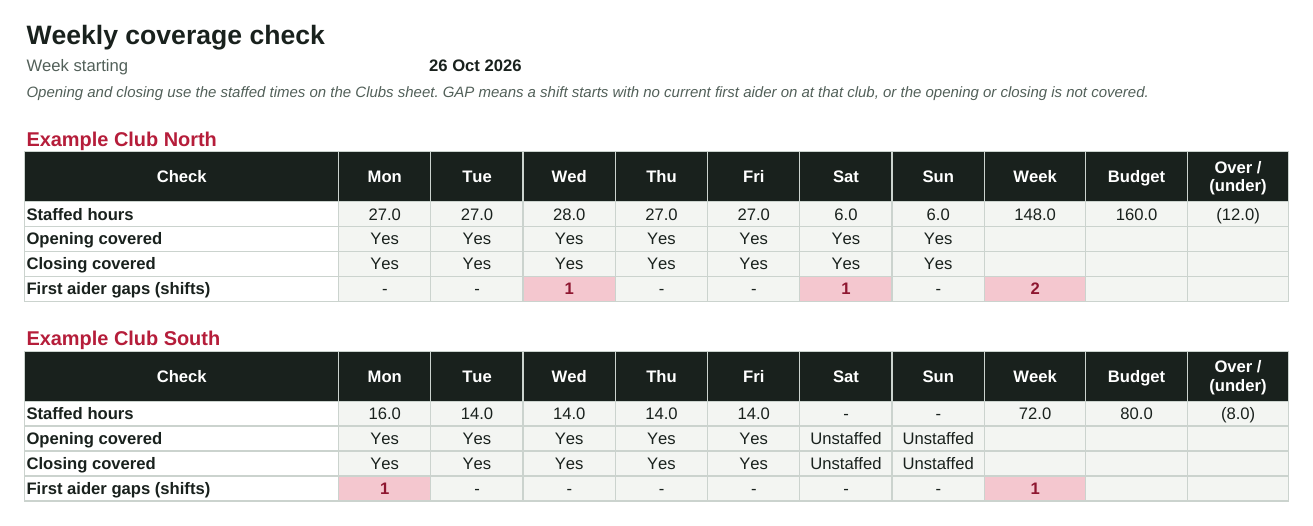
Plan a week of shifts across one club or several. The roster works out paid hours, including shifts that cross midnight, and the coverage check flags any day without an opener, a closer or a current first aider, plus hours against budget.
By Callan, ClubPilot · Updated
Free Excel template · Works in Google Sheets · No sign-up required
AT A GLANCE
Staff, role, club, day, start, finish and break, with paid hours calculated for every shift.
For each club and day: staffed hours, opening and closing covered, first aider gaps and the week against budget.
Role, employment type and first aid and CPR expiry dates, flagged when expired or expiring soon.
HOW IT WORKS
Enter your clubs' staffed hours and weekly hours budget, list your staff and their certificates, then enter shifts. The coverage sheet updates as you go.
PAY RATES
The template deliberately holds no pay rates. Most gym staff are covered by the Fitness Industry Award; check current rates, penalties and break rules with the Fair Work Ombudsman or your payroll provider.
Fair Work's summary of the award and its pay guides.
Visit the official pageOnboard new staff, track training and keep certificates current in ClubPilot.
Open pageSTRAIGHT ANSWERS
Yes. Upload the file to Google Drive and open it with Google Sheets.
For each shift, it checks whether someone with a current first aid certificate is rostered at the same club when the shift starts. If not, the shift and the day are flagged.
No. It totals paid hours only. Award rates and penalties change and depend on each employee, so use your payroll system for pay.
Use your rostering app for publishing shifts and timesheets. This template is useful for planning a new club, checking cover rules, or if you don't have an app yet.
FREE RESOURCES
Help a new manager learn the club, establish responsibilities and agree priorities before changing routines. Use weekly checkpoints with the area manager to turn observations into practical actions. Free PDF
Safety, emergencies, equipment, members and systems before a new starter works alone. Free PDF
Give each feedback item a response owner, due date and closure check. Keep sensitive member information in your approved member system and use references here. Free PDF
Record the opening float, approved additions, receipt-backed spending and counted closing cash. Investigate differences before sign-off. This is an operational record, not tax advice. Free PDF
Plan an open day, Christmas event or member challenge with preparation tasks, budget approval and a post-event review. Seasonal ideas help you adapt the activity without inventing guaranteed results. Free PDF
Make the next shift aware of unfinished work, unavailable equipment and promised follow-ups. Record acknowledgement so an urgent task does not disappear between shifts. Free PDF
A PRACTICAL NEXT STEP
ClubPilot keeps staff onboarding, training and manager routines in one place across every club, and can connect to Deputy rostering.