Schedule
Class, day, time, room, instructor and capacity for every session.

FREE EXCEL TEMPLATE
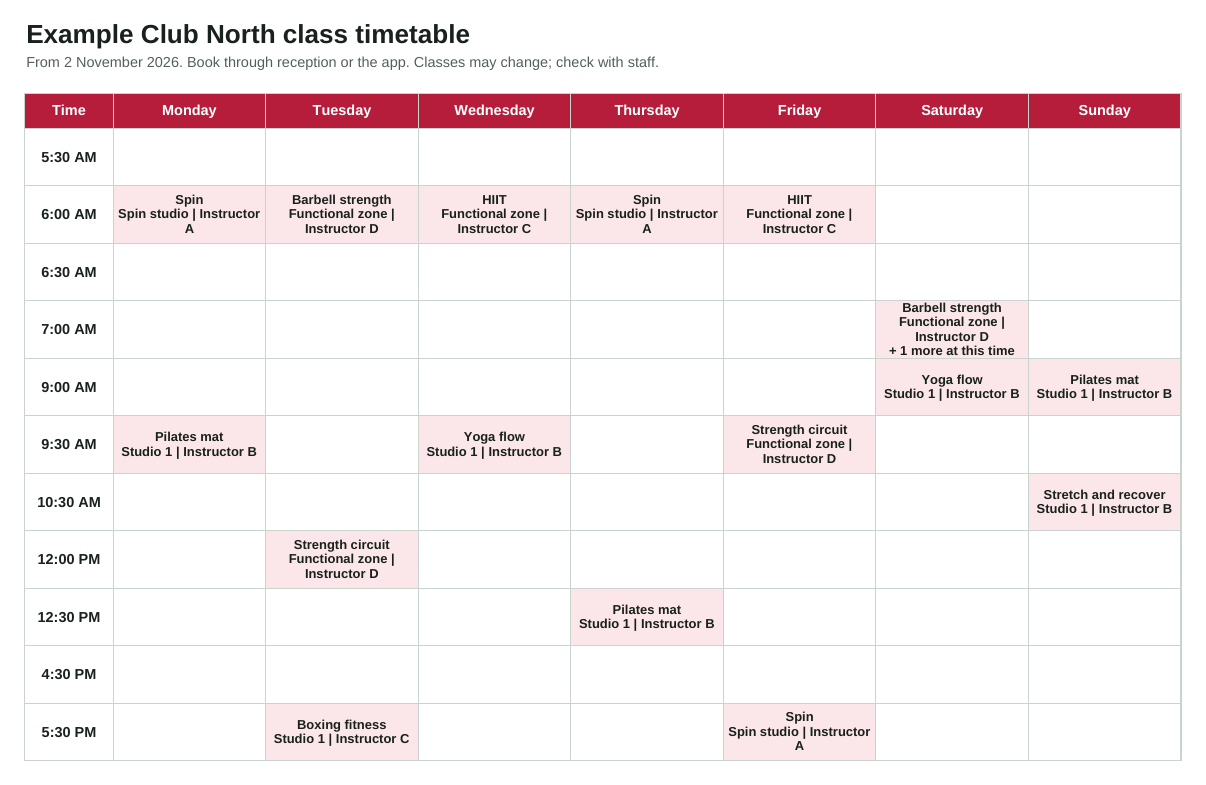
List your classes once, schedule them through the week, and the timetable builds itself as a printable, member-facing grid. Log attendance to see each class's average utilisation and which ones to review or add.
By Callan, ClubPilot · Updated
Free Excel template · Works in Google Sheets · No sign-up required
AT A GLANCE
Class, day, time, room, instructor and capacity for every session.
A landscape grid ready to print for reception or share as a PDF.
Average attendance and % full by class, with a prompt to review quiet classes or add busy ones.
HOW IT WORKS
Set up your classes and time slots, schedule the week and log attendance after each session.
Run the operations behind the timetable, from checklists to maintenance, in ClubPilot.
Open pageSTRAIGHT ANSWERS
Yes. The Timetable sheet is set up to print on one landscape A4 page. Save it as a PDF to share online.
The timetable shows the first and notes how many more start in that slot, so you can see clashes at a glance.
No. Keep bookings in your membership or booking app. Use this to plan the timetable and review attendance.
FREE RESOURCES
Record the opening float, approved additions, receipt-backed spending and counted closing cash. Investigate differences before sign-off. This is an operational record, not tax advice. Free PDF
Make the next shift aware of unfinished work, unavailable equipment and promised follow-ups. Record acknowledgement so an urgent task does not disappear between shifts. Free PDF
Opening, shift rounds, closing and manager review, with space to record missed items and handover. Free PDF
Prepare a walkthrough, capture useful evidence and assign follow-up. Free PDF
Access, safety, presentation and end-of-day security checks. Free PDF
Start-of-month, mid-month and end-of-month routines for each club. Free PDF
A PRACTICAL NEXT STEP
ClubPilot gives managers their recurring work, inspections and maintenance in one place, across every club.